Vertica Data Load Best Practices — COPY Command Deep Dive (25.x)
The efficiency of data loading directly impacts the throughput of your entire data pipeline in Vertica. Whether it’s daily batch ETL, real-time streaming ingestion, or large-scale historical data migration, the COPY command is the most fundamental tool.
As Vertica evolved through 25.x—WOS removed, Apportioned Load enabled by default, native Parquet/ORC support—many older best practices no longer apply. This article is based on hands-on testing with Vertica 25.4.0-0 and presents the latest data loading best practices.
1. Three Forms of COPY
| Form | Description | Use Case |
|---|---|---|
| COPY LOCAL | Upload file from client machine to Vertica server | One-time client upload |
| COPY (cluster source) | Read files from within the Vertica cluster (CSV/JSON/Parquet/ORC) | Data already on cluster nodes or NFS |
| COPY + UDL | Use User Defined Load functions (custom source/parser/filter) | Custom loading logic (S3, Kafka, custom format) |
Note: Vertica 25.x natively supports Parquet and ORC formats—no external tools or UDL required.
2. Modern COPY Architecture
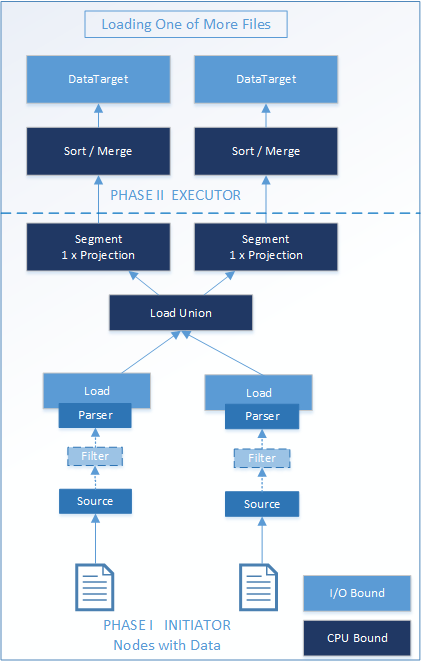
Two-Phase Processing
Phase I  (Initiator)  →  Read + parse files, distribute to other nodes
Phase II (Executor)   →  Sort + encode + merge write to ROS on all nodes
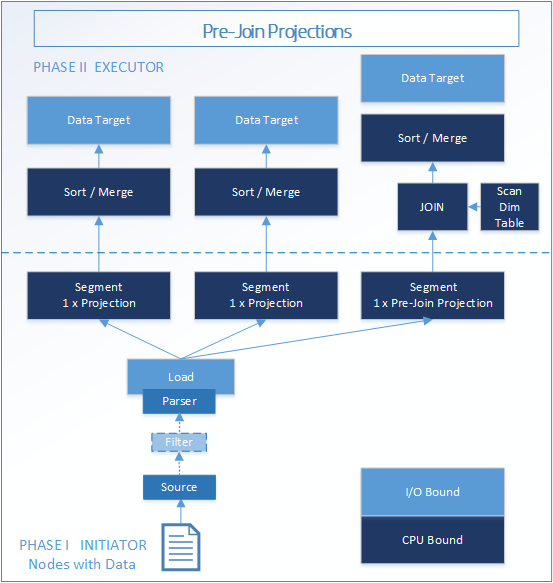
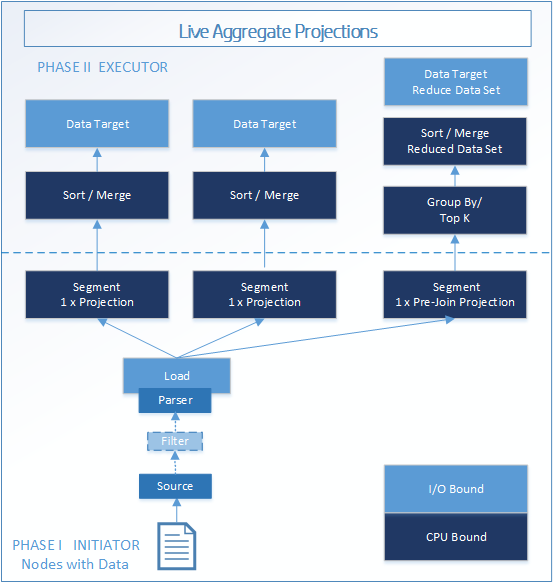
Execution Engine Flow
Load → Parse → Load Union → Segment → Sort/Merge → DataTarget (ROS write)
- Pre-join projections: Automatically adds JOIN + SCAN operators
- Live aggregate projections: Automatically adds GROUP BY / Top-K operators
Apportioned Load (Parallel Loading)
Apportioned Load was introduced in Vertica 8.0+ and is now enabled by default in 25.x. When all nodes can access the source data (e.g., on NFS), Phase I runs in parallel across multiple nodes.
Related parameters (all default=1 in 25.x):
| Parameter | Description |
|---|---|
EnableApportionLoad |
Global apportioned load toggle |
EnableApportionedFileLoad |
Built-in file source apportioned load |
EnableApportionedChunkingInDefaultLoadParser |
Chunk-level apportionment in default parser |
ApportionedFileMinimumPortionSizeKB (default: 1024 KB) |
Minimum portion size |
Modern vs Legacy Comparison
| Feature | Legacy (≤10.x) | Modern (25.x) |
|---|---|---|
| Storage Target | WOS → ROS | Direct ROS |
| Load Mode | AUTO/DIRECT/TRICKLE | Always optimized |
| Parallel Load | Manual enable | Default + multi-level |
| Cooperative Parse | Manual enable | Default enabled |
| Parquet/ORC | Required UDL | Native support |
3. Resource Pool Tuning
System Resource Pools Overview
=> SELECT name, memorysize, maxmemorysize, plannedconcurrency,
          maxconcurrency, executionparallelism, priority
   FROM resource_pools;
| Pool | Purpose | memorysize | Notes |
|---|---|---|---|
| general | Queries + loads | 95% (Special) | Default pool |
| sysquery | System queries | 5% | Do not modify |
| tm | Tuple Mover | 5% | maxconcurrency=7 |
| recovery | Node recovery | 0% | maxconcurrency=5 |
| dbd | Database Designer | 0% | — |
| jvm | JVM features | 0% / max=4G | plannedconcurrency=2 |
Key Parameters
PLANNEDCONCURRENCY
Controls query_budget allocation per query. Modern value: AUTO (dynamic).
=> CREATE RESOURCE POOL load_pool
   PLANNEDCONCURRENCY 2
   MAXCONCURRENCY 3
   EXECUTIONPARALLELISM AUTO;
MAXCONCURRENCY
Maximum concurrent COPY jobs; excess jobs queue.
=> ALTER RESOURCE POOL load_pool MAXCONCURRENCY 4;
EXECUTIONPARALLELISM
Threads per query. Modern value: AUTO.
=> ALTER RESOURCE POOL load_pool EXECUTIONPARALLELISM 4;
Practical Tuning Steps
-- Step 1: Create dedicated load pool
CREATE RESOURCE POOL load_pool
  PLANNEDCONCURRENCY 2
  MAXCONCURRENCY 4
  EXECUTIONPARALLELISM AUTO
  QUEUETIMEOUT '00:30'
  PRIORITY 5;

-- Step 2: Route load queries to this pool
=> SET SESSION RESOURCE POOL load_pool;
=> COPY my_table FROM '/data/file.csv';
4. Configuration Parameters (25.x Verified)
Parse Phase
| Parameter | Default | Description | Tuning |
|---|---|---|---|
EnableCooperativeParse |
1 (on) | Multi-threaded cooperative parsing | Ensure = 1 |
SortWorkerThreads |
-1 | Sort worker threads; -1=auto | Increase (e.g., 4) if bottleneck |
Load Phase
| Parameter | Default | Description | Tuning |
|---|---|---|---|
EnableApportionLoad |
1 (on) | Global apportioned load | Keep = 1 |
EnableApportionedFileLoad |
1 (on) | File source apportionment | Keep = 1 |
ApportionedFileMinimumPortionSizeKB |
1024 KB | Minimum portion size | Increase (e.g., 4096) for large files |
ParallelizeLocalSegmentLoad |
1 (on) | Multi-threaded local segment load | Keep = 1 |
Network
| Parameter | Default | Description | Tuning |
|---|---|---|---|
CompressNetworkData |
0 (off) | Inter-node data compression | Set = 1 for cross-network |
Verify Parameters
=> SELECT parameter_name, current_value, default_value, description
   FROM configuration_parameters
   WHERE parameter_name IN (
     'EnableCooperativeParse', 'SortWorkerThreads',
     'EnableApportionLoad', 'CompressNetworkData'
   );
5. Monitoring Loads
Active Load Streams
=> SELECT transaction_id, table_name, accepted_row_count,
          parse_complete_percent, sort_complete_percent,
          load_duration_ms, input_file_size_bytes
   FROM v_monitor.load_streams
   WHERE is_executing = true;
Load History Events
=> SELECT load_status, rows_loaded, file_name, failure_reason, time_stamp
   FROM v_monitor.data_loader_events
   ORDER BY time_stamp DESC LIMIT 50;
ROS Container Health Check
=> SELECT projection_name, COUNT(*) AS ros_count,
          SUM(ros_row_count) AS total_rows
   FROM v_monitor.projection_storage
   GROUP BY projection_name
   ORDER BY ros_count DESC LIMIT 20;
6. Common Bottleneck Scenarios
6.1 Large File Loading Slow
Cause: Single file > several GB; single-node parse/sort becomes bottleneck.
Solution A — Apportioned Load (default in 25.x):
- Verify
EnableApportionedFileLoad = 1 - Place files on NFS accessible to all nodes
Solution B — Tune ApportionedFileMinimumPortionSizeKB:
=> ALTER DATABASE testdb SET ApportionedFileMinimumPortionSizeKB = 4096;
Solution C — File Splitting + NFS: Split large files into 1–5 GB chunks on NFS
6.2 Many Small Files
Cause: Each COPY creates a separate ROS container → excessive ROS containers.
Solutions:
- Single COPY with multiple files:
=> COPY my_table FROM '/data/file1.dat', '/data/file2.dat'; - Linux pipe merge:
cat /data/*.csv | vsql -c "COPY my_table FROM STDIN DELIMITER ',';"
6.3 Wide Table Bottleneck
Cause: Hundreds of VARCHAR columns → Phase II sort/encode becomes slow.
Solutions:
- Use GROUPED columns:
=> CREATE TABLE wide_table ( pk INT, col1 VARCHAR(100), col2 VARCHAR(100), col3 VARCHAR(100) ) GROUPED (col1, col2, col3); - Move unnecessary TEXT/VARCHAR to flex tables
- Adjust SortWorkerThreads:
=> ALTER DATABASE testdb SET SortWorkerThreads = 4;
6.4 GZIP CPU Bottleneck
# Decompress before load
$ gunzip -c /data/file.csv.gz | vsql -c "COPY my_table FROM STDIN;"
6.5 Load Interfering with Queries
=> CREATE RESOURCE POOL batch_load
   PLANNEDCONCURRENCY 2
   MAXCONCURRENCY 3
   PRIORITY 0;  -- Low priority
=> SET SESSION RESOURCE POOL batch_load;
7. Quick Diagnostic Checklist
-- 7.1 Resource pool status
=> SELECT name, memorysize, plannedconcurrency, running_query_count,
          query_budget_kb, memory_inuse_kb
   FROM resource_pool_status
   WHERE name IN ('general', 'batch_load', 'load_pool');

-- 7.2 Current active loads
=> SELECT * FROM v_monitor.load_streams WHERE is_executing = true;

-- 7.3 Recent load events
=> SELECT load_status, rows_loaded, file_name, time_stamp
   FROM v_monitor.data_loader_events
   WHERE time_stamp >= NOW() - INTERVAL '1 day';

-- 7.4 ROS container health
=> SELECT projection_schema, projection_name,
          COUNT(*) AS ros_count, SUM(ros_row_count) AS total_rows,
          SUM(ros_used_bytes) AS total_bytes
   FROM v_monitor.projection_storage
   GROUP BY projection_schema, projection_name
   HAVING COUNT(*) > 500 ORDER BY ros_count DESC;
8. Golden Rules Summary
| Scenario | Best Practice |
|---|---|
| Large file ≥5GB | Ensure EnableApportionedFileLoad=1, file on NFS |
| Many small files | Combine into single COPY or Linux pipe |
| Wide table | GROUPED columns + vertical split |
| GZIP CPU high | Decompress before pipe into COPY FROM STDIN |
| Load vs query interference | Dedicated batch_load pool (low priority) |
| Parse bottleneck | Verify EnableCooperativeParse = 1 |
| Sort bottleneck | SortWorkerThreads = 4 |
| Cross-node network | CompressNetworkData = 1 |
| Resource contention | Custom RESOURCE POOL + MAXCONCURRENCY |
| Load timeout | Increase QUEUETIMEOUT (default 5min) |
Appendix: Legacy → 25.x Migration
| Legacy (≤10.x) | 25.x Replacement |
|---|---|
| COPY AUTO | Not needed, direct ROS |
| COPY DIRECT | Default behavior |
| COPY TRICKLE | Removed |
| WOS | Removed |
| LOAD_OPERATIONS | v_monitor.data_loader_events |
| ReuseDataConnections | Removed (auto-managed) |
| DataBufferDepth | Removed |
| LoadMergeChunkSizeK | Removed |
Based on Vertica 25.4.0-0 hands-on testing. All SQL examples have been verified against a live Vertica instance. For questions or feedback, please visit GitHub.
FAQ
What COPY forms does Vertica 25.x support?
The article covers single-file COPY, multi-file COPY, and Apportioned Load. Apportioned Load splits the work into parallel units and is a key 25.x default.
Where should I look first when COPY is slow?
Check resource-pool queuing (PLANNEDCONCURRENCY/MAXCONCURRENCY), network and disk, then load_streams, query_requests, and resource_rejections.
Do large files and many small files hit the same bottleneck?
No. Large files stress parse, network, and ROS writes; many small files pay per-file open overhead, so combine files or use streaming/UDL.