Vertica Node Down Recovery Field Guide — Practical Guide (25.x)
One of the worst scenarios in any database cluster is a node going DOWN. When a Vertica cluster node goes offline, it stops participating in any transactions committed after that point. After restart, it must recover missed data from buddy nodes before coming back online.
This article breaks down the Vertica 25.x node recovery process end-to-end with practical troubleshooting guidance.
1. Node State Transitions
DOWN → (restart) → INITIALIZING → RECOVERING → READY → UP
| State | Description |
|---|---|
| DOWN | Node offline, not participating in any transactions |
| INITIALIZING | Node rejoining cluster, receiving new global catalog |
| RECOVERING | Recovering data from buddy nodes; can participate in data loads |
| READY | Recovery complete, awaiting transition |
| UP | Fully recovered, accepting connections and queries |
Key Features in 25.x
- Multi-table parallel recovery: Vertica 7.2.2+ supports recovering multiple tables concurrently (controlled by RECOVERY pool MAXCONCURRENCY)
- Tuple Mover runs during recovery: mergeout and moveout continue operating
- Customizable recovery priority: Use
recover_priorityto control table recovery order
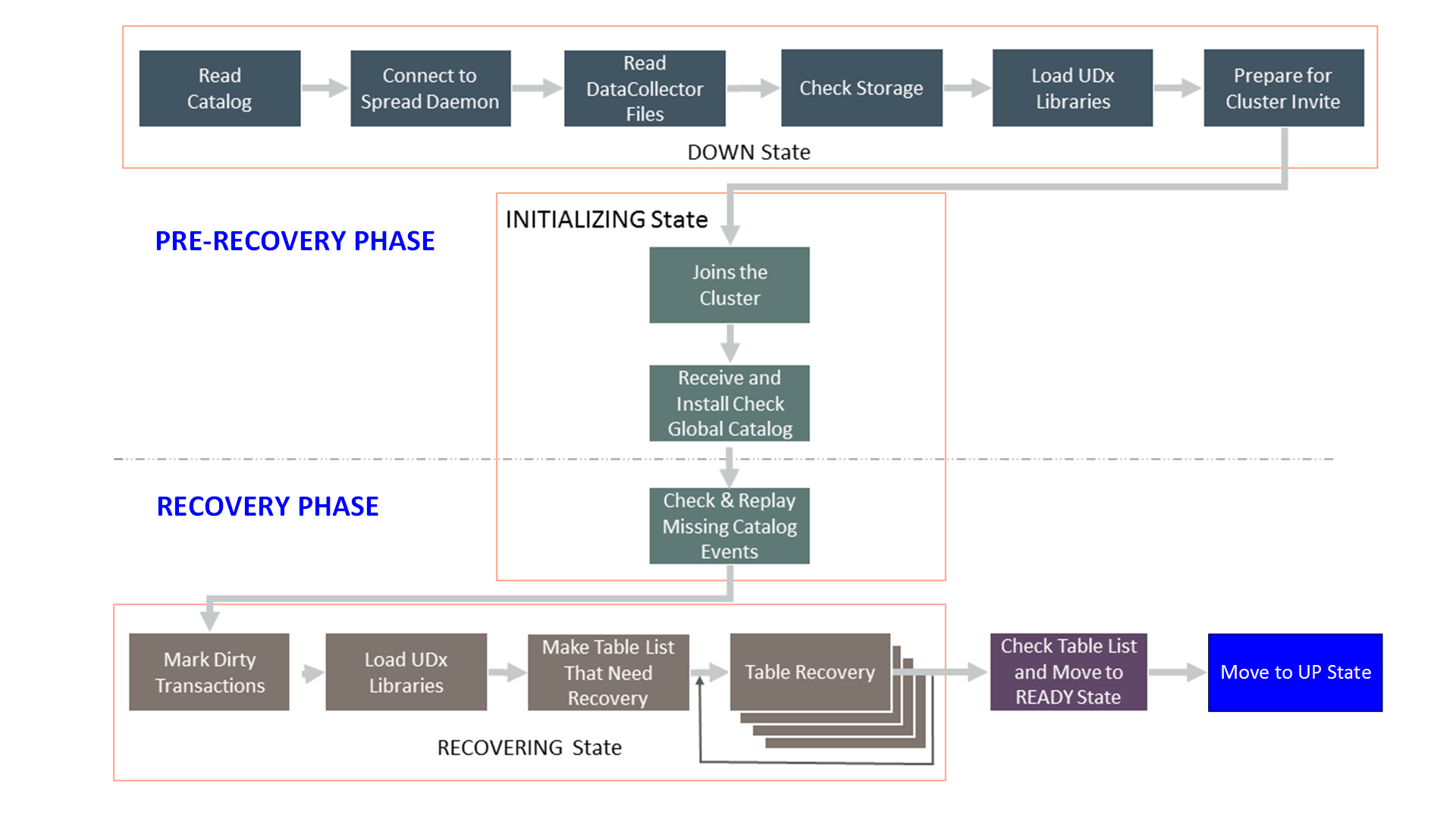
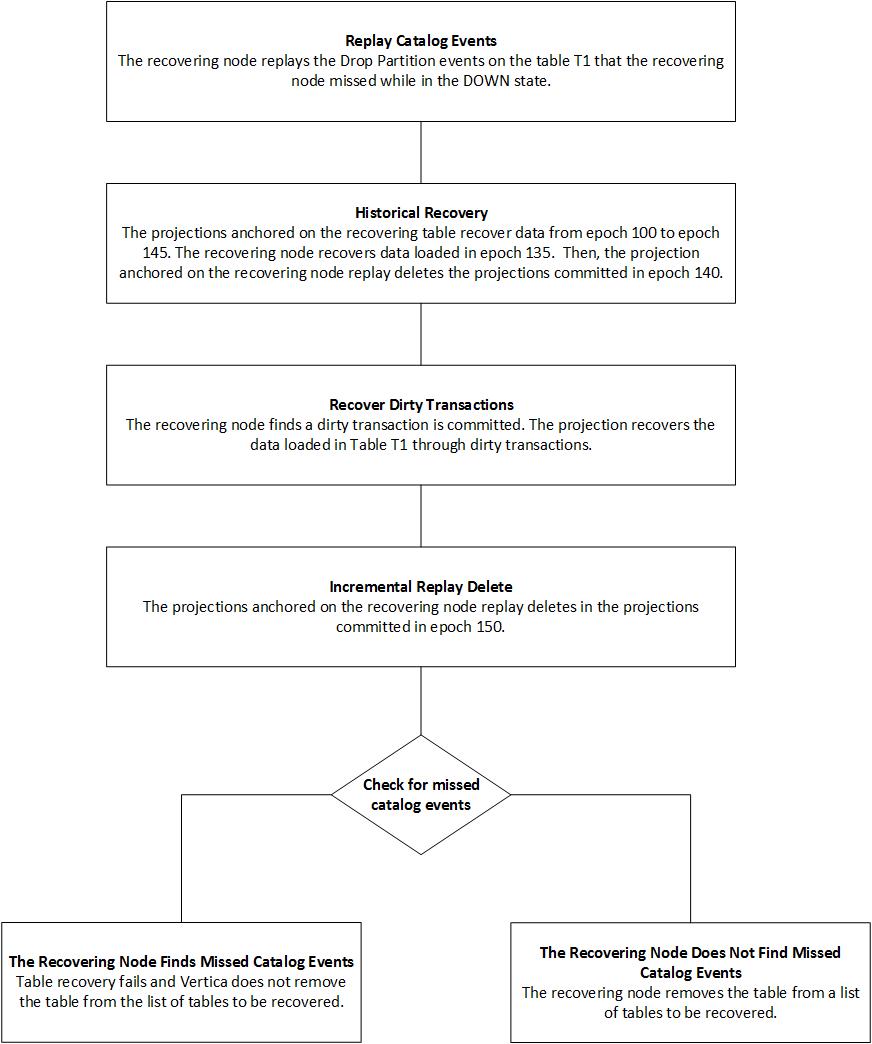
2. Two-Phase Recovery
2.1 Pre-Recovery Phase
From node restart until it rejoins the cluster. Logs: startup.log and vertica.log.
| Step | Description |
|---|---|
| 1. Read catalog | Read catalog checkpoint → apply transaction log → index catalog objects |
| 2. Start spread daemon | Start and connect spread daemon |
| 3. Read DataCollector | Inventory DataCollector files |
| 4. Check data storage | Verify file existence, permissions, correctness; remove unreferenced files |
| 5. Load UDx | Load User Defined Extension libraries |
| 6. Prepare cluster invite | Join spread group → broadcast → wait for invitation |
| 7. Join cluster | Accept invitation → state changes to INITIALIZING |
| 8. Receive new global catalog | UP nodes send global catalog in 1GB chunks |
2.2 Recovery Phase
From joining the cluster until fully UP.
| Step | Description |
|---|---|
| 1. Replay missed catalog events | Replay events (ALTER PARTITION, RESTORE TABLE, etc.) in commit order |
| 2. Mark dirty transactions | Mark transactions started but not committed before recovery |
| 3. Load UDx | Receive and load UDx from UP nodes |
| 4. Build recovery table list | List all tables needing recovery |
| 5. Execute table recovery | Recover data from buddy nodes (max 20 retries) |
| 6. Check list → READY | Empty list → state becomes READY |
| 7. Transition to UP | Start accepting connections |
3. RECOVERY Resource Pool Tuning
=> SELECT * FROM resource_pools WHERE name = 'recovery';
Default Settings (25.4)
| Parameter | Default | Description |
|---|---|---|
| memorysize | 0% | Borrows from general pool |
| plannedconcurrency | AUTO | Automatic |
| maxconcurrency | 5 | Key: Controls concurrent projection buddy groups |
| priority | 107 | High priority |
| queuetimeout | 00:05 | 5 minutes |
Tuning
-- Increase parallelism (faster recovery, more resources)
=> ALTER RESOURCE POOL recovery MAXCONCURRENCY 8;

-- Decrease parallelism (less impact on live queries)
=> ALTER RESOURCE POOL recovery MAXCONCURRENCY 2;
4. Recovery Methods
| Method | Description | Use Case |
|---|---|---|
| recovery-by-container | Copy entire ROS container | Small data, few changes |
| incremental | Incremental, copy only differences | Large data, mostly local |
| incremental-replay-delete | Incremental + replay DELETE ops | Heavy DELETE workloads |
=> SELECT node_name, projection_name, method, status, progress, detail
   FROM v_monitor.projection_recoveries
   ORDER BY start_time DESC LIMIT 20;
5. Monitoring Recovery
Overall Status
=> SELECT node_name, is_running, recovery_phase,
          current_completed, current_total,
          historical_completed, historical_total
   FROM v_monitor.recovery_status;
Per-Table Recovery Status
=> SELECT node_name, recovering_table_name, tables_remain,
          node_recovery_start_time, recover_epoch
   FROM v_monitor.table_recovery_status
   WHERE is_running = true;
Per-Projection Details
=> SELECT node_name, projection_name, method, status, progress, detail
   FROM v_monitor.projection_recoveries
   ORDER BY start_time DESC LIMIT 50;
Check Recovery Errors
=> SELECT node_name, table_name, status, phase, recover_error
   FROM v_monitor.table_recoveries
   WHERE status = 'error-retry';
6. Dirty Transaction Handling
Transactions started but not committed before the RECOVERY phase begins:
- Marked as dirty transactions
- Waited up to 5 minutes for commit (controlled by
RecoveryDirtyTxnWait) - Terminated if not committed after 5 minutes
Operations that can trigger dirty transactions
| Operation | Example |
|---|---|
| TRUNCATE TABLE | Clear data without affecting catalog |
| ADD COLUMN | Incomplete DDL |
| DROP/RESTORE TABLE | Table structure changes |
| MOVE/SWAP PARTITION | Partition movement |
| REBALANCE TABLE | Data rebalancing |
| REPLACE NODE | Node replacement |
7. Common Issues
7.1 Node Cannot Rejoin Cluster
| Step | Command |
|---|---|
| 1. Check startup.log | tail -f <catalog-path>/startup.log |
| 2. Check spread.conf | Compare across all nodes |
| 3. Check network | nc -zv <node-ip> 4803 |
| 4. Force restart node | admintools -t restart_node -d <db> --hosts <ip> --force |
7.2 Recovery Repeated Failures (incrCatchUpFailureCount)
-- Check LockTimeout
=> SELECT GET_CONFIG_PARAMETER('LockTimeout');
=> ALTER DATABASE testdb SET LockTimeout = 600;
7.3 Catalog Too Large / ROS Files Too Many
=> SELECT projection_name, COUNT(*) AS ros_count
   FROM v_monitor.projection_storage
   GROUP BY projection_name
   HAVING COUNT(*) > 1000;
7.4 Table Recovery Stuck — Event apply failed
=> SELECT node_name, table_name, status, phase, recover_error
   FROM v_monitor.table_recoveries
   WHERE status = 'error-retry';
8. Preventive Measures
-- RECOVERY pool pre-tuning
=> ALTER RESOURCE POOL recovery MAXCONCURRENCY 8;

-- ROS container management
=> SELECT COUNT(*) FROM v_monitor.projection_storage;
=> SELECT DO_TM_TASK('mergeout');

-- LockTimeout
=> SELECT GET_CONFIG_PARAMETER('LockTimeout');

-- K-Safety
=> SELECT get_vertica_options('KSAFETY');

-- Regular backup
$ /opt/vertica/bin/vbr -t backup -c backup.ini
9. Quick Checklist
Before Recovery
# [ ] Check node status
$ admintools -t view_cluster
# [ ] Check spread.conf consistency
$ cat /opt/vertica/config/spread.conf
# [ ] Check disk space
$ df -h
During Recovery
-- [ ] Check overall recovery status
=> SELECT * FROM v_monitor.recovery_status;
-- [ ] Check currently recovering tables
=> SELECT * FROM v_monitor.table_recovery_status WHERE is_running = true;
After Recovery
-- [ ] Confirm nodes are UP
=> SELECT node_name, node_state FROM v_catalog.nodes;
-- [ ] Check for error-retry tables
=> SELECT * FROM v_monitor.table_recoveries WHERE status NOT IN ('recovered','finished');
-- [ ] Check expired projections
=> SELECT * FROM projections WHERE is_up_to_date = false;
10. Golden Rules Summary
| Phase | Key Points |
|---|---|
| Prevention | K-safety ≥ 1; pre-tune RECOVERY pool MAXCONCURRENCY; control ROS containers; set LockTimeout (300-600s); regular backups |
| Diagnose first | recovery_status → table_recovery_status → projection_recoveries |
| Accelerate | Increase MAXCONCURRENCY; pause unnecessary ETL; ensure network bandwidth |
| After completion | Confirm all nodes UP; check no expired projections |
Based on Vertica 25.4.0-0 hands-on testing. All examples verified against a live instance.
FAQ
What are the two recovery phases?
Pre-Recovery (prepare and validate) and Recovery (restore missing data from buddy nodes).
What affects recovery speed?
RECOVERY pool MAXCONCURRENCY, network, disk, buddy-node load, and data volume.
How are dirty transactions handled?
Recovery replays or rolls back dirty transactions. Monitor recovery_status, table_recoveries, and projection_recoveries, and follow the KB for exceptions.