Vertica Cluster Rebalancing Field Guide (25.x)
When you add or remove nodes in a Vertica cluster, data must be redistributed evenly across all nodes for optimal performance. This process is called Rebalancing. However, rebalancing is CPU-, disk-, and network-intensive and can impact live queries if not properly planned.
This article provides a complete look at Vertica 25.x rebalancing, from preparation to validation.
1. What is Rebalancing?
| Scenario | Reason |
|---|---|
| Adding nodes | Data growth, need more compute/storage |
| Removing nodes | Over-provisioned, hardware reallocation |
Three Ways to Start
-- Full cluster rebalance
=> SELECT REBALANCE_CLUSTER();

-- Single table rebalance
=> SELECT REBALANCE_TABLE('table_name');

-- Via Management Console
2. Architecture & Flow
2.1 Resource Pool
Rebalancing always uses the built-in REFRESH resource pool:
=> SELECT * FROM resource_pools WHERE name = 'refresh';
| Field | Default (25.4) | Description |
|---|---|---|
| memorysize | 0% | Borrows from general pool |
| plannedconcurrency | AUTO | Controls concurrent buddy groups |
| priority | -10 | Low priority |
| queuetimeout | 00:05 | 5 min |
2.2 Four Phases
Phase 1: Lock
  ├── Unsegmented projections: X lock (exclusive)
  └── Segmented projections: S lock (shared)

Phase 2: Copy
  ├── Unsegmented: copy full data (low CPU)
  └── Segmented: read, split, write (high CPU/IO)

Phase 3: Separate ROS Containers ⚡️
  └── ~80% of total rebalance time

Phase 4: Transfer
  └── Send split ROS containers to target nodes
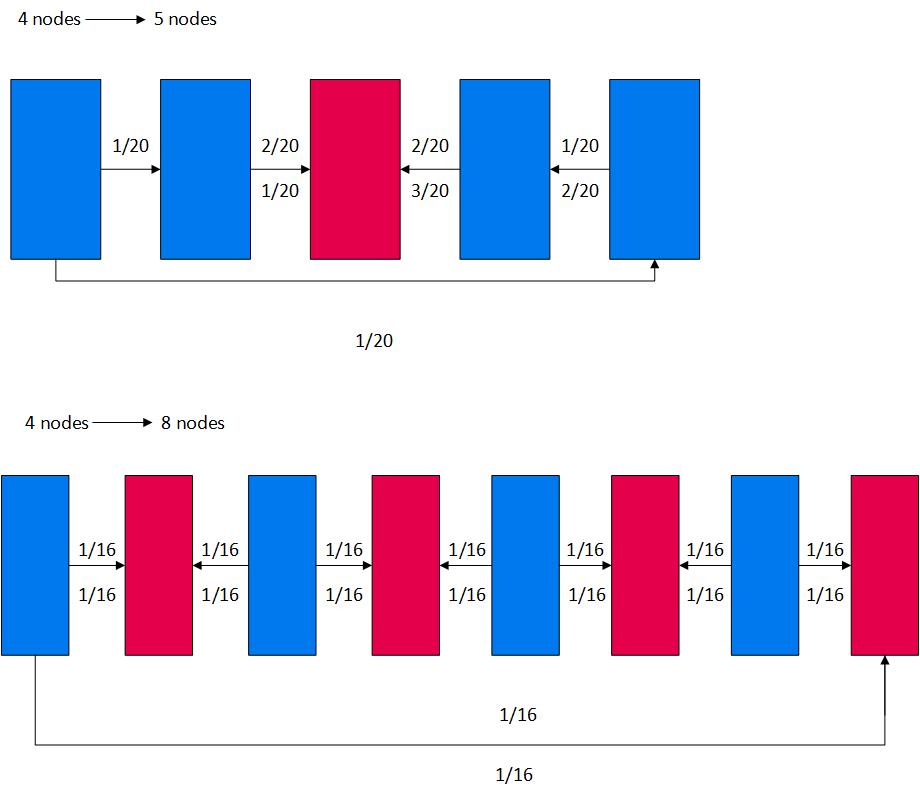
2.3 Data Movement Example
4 nodes → 5 nodes:
Before: Each node has 1/4 of data
After:  Each node has 1/5 of data
Moved:  ~1/20 of data per old node
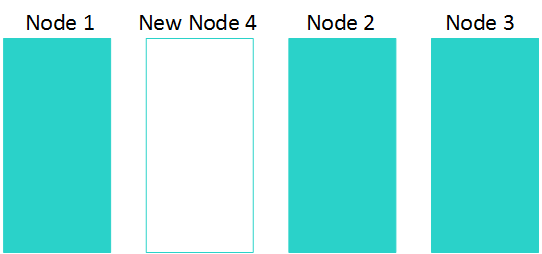
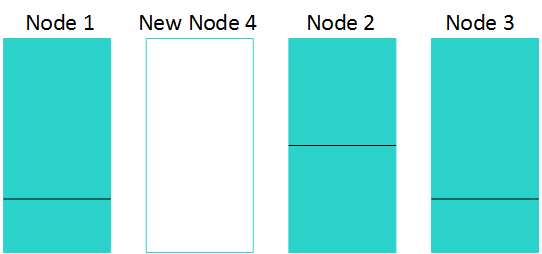
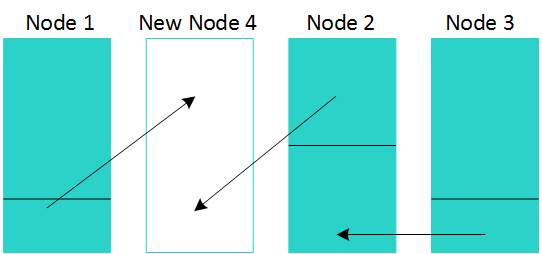
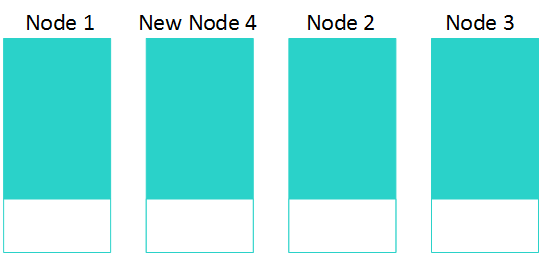
2.4 Node Insertion Position
Vertica automatically chooses positions that minimize data movement:
Three-node cluster adding a fourth:
    [N1] ←→ [N2] ←→ [N3]
              ↓
             [N4]    ← gets data from N2
3. Pre-Rebalancing Preparation
✅ Verify Local Segmentation is Off
=> SELECT parameter_name, current_value
   FROM configuration_parameters
   WHERE parameter_name = 'EnableLocalSegmentCreation';
✅ Check Disk Space
At least 40% free space for intermediate operations:
=> SELECT SUM(used_bytes) / (1024^3) AS database_size_gb
   FROM v_monitor.projection_storage;
✅ Check REFRESH Pool
=> SELECT name, memorysize, plannedconcurrency, priority
   FROM resource_pools WHERE name = 'refresh';
-- Increase parallelism (faster but more resources)
=> ALTER RESOURCE POOL refresh PLANNEDCONCURRENCY 4;
✅ Check LockTimeout
=> SELECT GET_CONFIG_PARAMETER('LockTimeout');
=> ALTER DATABASE testdb SET LockTimeout = 600;
✅ Check DMLCancelTM
=> SELECT GET_CONFIG_PARAMETER('DMLCancelTM');
4. Monitoring During Rebalancing
Tables Being Rebalanced
=> SELECT * FROM v_monitor.rebalance_table_status
   WHERE is_latest = true ORDER BY start_timestamp;
Per-Projection Progress
=> SELECT projection_name, rebalance_method,
          separated_percent, transferred_percent
   FROM v_monitor.rebalance_projection_status
   WHERE is_latest = true
     AND (separated_percent <> 100 OR transferred_percent <> 100);
Overall Progress Summary
=> SELECT rebalance_method,
          CASE WHEN separated_percent + transferred_percent = 200 THEN 'Completed'
               WHEN separated_percent > 0 OR transferred_percent > 0 THEN 'In Progress'
               ELSE 'Queued' END AS status,
          COUNT(*) AS count
   FROM v_monitor.rebalance_projection_status
   WHERE is_latest = true
   GROUP BY 1, 2;
Active Rebalance Sessions
=> SELECT node_name, session_id, session_start_timestamp, description
   FROM system_sessions
   WHERE session_type = 'REBALANCE_CLUSTER' AND is_active;
Per-Operation Timing
=> SELECT node_name, object_name, operation_name,
          (operation_end_timestamp - operation_start_timestamp) AS duration
   FROM v_monitor.rebalance_operations
   WHERE is_latest = true
   ORDER BY duration DESC LIMIT 20;
5. Post-Rebalancing Checks
Verify All Tables Rebalanced
=> SELECT COUNT(*) AS not_rebalanced
   FROM v_monitor.rebalance_table_status
   WHERE is_latest = true
     AND separated_percent + transferred_percent <> 200;
Check Expired Projections
=> SELECT projection_name, anchor_table_name
   FROM projections WHERE is_up_to_date = false;
Reset LockTimeout
=> ALTER DATABASE testdb SET LockTimeout = 300;
Check ROS Container Health
=> SELECT projection_name, COUNT(*) AS ros_count
   FROM v_monitor.projection_storage
   GROUP BY projection_name
   HAVING COUNT(*) > 1000
   ORDER BY ros_count DESC;
6. Lock Conflicts
Common Scenarios
| Operation | Conflict Type | Error |
|---|---|---|
| DDL (ALTER TABLE) | X lock conflict | ERROR 3007: DDL interfered |
| DML (INSERT/UPDATE/DELETE) | S lock conflict | ERROR 5157: Locking failure |
| SWAP/MOVE PARTITION | Projection mismatch | ERROR 7121: Tables not match |
Lock Diagnostic
=> SELECT DATE_TRUNC('hour', grant_time) AS hour,
          COUNT(*) AS tx_count
   FROM dc_lock_releases
   WHERE (time - grant_time) > INTERVAL '5 min'
     AND mode IN ('X', 'S')
     AND object_name NOT LIKE 'ElasticCluster'
   GROUP BY 1 ORDER BY 2;
Solutions
A: Increase LockTimeout
=> ALTER DATABASE testdb SET LockTimeout = 600;
B: Prioritize Rebalance
=> SELECT SET_CONFIG_PARAMETER('DMLCancelTM', false);
=> SELECT REBALANCE_CLUSTER();
=> SELECT SET_CONFIG_PARAMETER('DMLCancelTM', true);
C: Manual Batch Rebalance — see next section
7. Manual Batch Rebalancing
For large clusters with many tables, a full rebalance may take days. Manual batching minimizes lock conflicts:
=> SELECT REBALANCE_TABLE('table_A');
=> SELECT REBALANCE_TABLE('table_B');
Check Rebalance Status
=> SELECT table_name,
          CASE WHEN separated_percent + transferred_percent = 200 THEN 'REBALANCED'
               WHEN separated_percent + transferred_percent > 0 THEN 'REBALANCING'
               ELSE 'NOT REBALANCED' END AS status
   FROM v_monitor.rebalance_table_status
   WHERE is_latest = true
   ORDER BY status, table_name;
8. Common Errors
| Error | Cause | Solution |
|---|---|---|
| ERROR 3007 | DDL conflicts with rebalance | Pause DDL or use REBALANCE_TABLE() |
| ERROR 5157 | Lock timeout | Increase LockTimeout |
| ERROR 7121 | Projection mismatch | Both tables must be at same rebalance state |
9. Quick Checklist
Before
-- [ ] Local segmentation off
-- [ ] REFRESH pool checked
-- [ ] LockTimeout set (600s)
-- [ ] 40%+ free disk space
During
-- [ ] Overall progress via rebalance_projection_status
-- [ ] Separated/transferred percentages
After
-- [ ] All tables rebalanced
-- [ ] No expired projections
-- [ ] Reset LockTimeout
-- [ ] ROS container health ok
Based on Vertica 25.4.0-0 testing. All SQL verified against a live instance.
FAQ
What are the four rebalancing phases?
Lock, Copy, Separate, and Transfer.
What should I prepare before rebalancing?
Enough disk space (about 40%), LockTimeout/DMLCancelTM, an off-peak window, and REFRESH pool PLANNEDCONCURRENCY.
How do I handle lock conflicts?
Check v_monitor.locks and the rebalance_* tables, resolve ERROR 3007/5157/7121, and batch or retry if needed.