Vertica Privileges and Roles in Practice: GRANT, Role Inheritance, and Schema-Level Rights
1. The short version
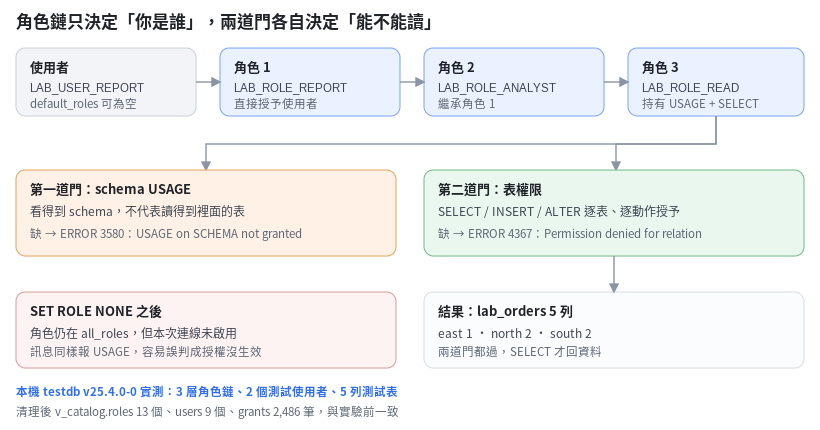
Most Vertica privilege incidents are not “nobody ran the GRANT”. They are “the GRANT was right but never took effect”, or “only one of the two gates was opened”. After a full round of testing on a local database, four findings are worth stating up front:
- Reading a table has to clear two gates:
USAGEon the schema andSELECTon the table. Missing the first returnsERROR 3580; missing the second returnsERROR 4367. The error code tells you which one is closed. GRANT role TO userdoes not enable the role. After the grant,v_catalog.users.all_rolesis populated, butdefault_rolesis empty. A fresh connection fails, and the message says “USAGE not granted” — which reads like a broken schema grant when the real cause is an inactive role.- Inheritance itself is fine. Three levels (user → role → role → role), with the privilege attached at the bottom, returned data in testing. Inheritance was never the problem; activation was.
REVOKErolls the whole statement back when dependent grants exist:ROLLBACK 3052: Dependent privileges exist. You needCASCADE.
Every number below comes from an actual run on the local testdb. All test objects lived in a dedicated article_lab_privileges schema and LAB_* roles, and everything was dropped afterwards. v_catalog.roles went back to 13 rows, users to 9, and grants to 2,486 — identical to the pre-test baseline.
2. Test environment
| Item | Value |
|---|---|
| Database | testdb, single node, Community Edition |
| Version | Vertica Analytic Database v25.4.0-0 |
| Test schema | article_lab_privileges (3 tables: lab_orders 5 rows, lab_customers 3 rows, lab_regions 3 rows) |
| Test roles | LAB_ROLE_READ, LAB_ROLE_ANALYST, LAB_ROLE_REPORT, LAB_ROLE_GRANTOR |
| Test users | LAB_USER_REPORT, LAB_USER_GRANTOR |
| Baseline | 13 roles, 9 users, 2,486 grants |
| Run date | 2026-11-23 05:00 (Asia/Taipei) |
All DDL and DML stayed inside the self-built schema, roles, and users. Nothing touched dbadmin, any existing role, or grants on public.
While setting up, I measured the overall grant footprint of the database, which is useful context for what an audit query looks like at real scale:
=> SELECT count(*) AS total_grants, count(DISTINCT grantee) AS distinct_grantees
   FROM v_catalog.grants;
 total_grants | distinct_grantees
--------------+-------------------
         2486 |                20

=> SELECT object_type, count(*) FROM v_catalog.grants GROUP BY 1 ORDER BY 2 DESC;
 object_type      | count
------------------+-------
 TABLE            |  1365
 PROCEDURE        |   658
 VIEW             |   372
 SCHEMA           |    75
 RESOURCEPOOL     |     8
 ROLE             |     5
 CLIENTAUTHENTICATION | 3
Only 5 rows are ROLE grants — role-to-role grants are rare across the whole database, which is precisely why a badly built role chain rarely shows up in day-to-day queries.
3. How it works: three concepts, two gates
Vertica splits privileges into three layers, and mixing them up is where confusion starts:
| Layer | What it covers | Granted to | Who can grant |
|---|---|---|---|
| System privileges | built-in roles such as dbadmin, dbduser, sysmonitor, udxdeveloper, operator |
users or roles | superuser / useradmin |
| Object privileges | schema USAGE/CREATE; table SELECT/INSERT/UPDATE/DELETE/ALTER/REFERENCES/TRUNCATE/DROP |
users or roles | object owner, or anyone with WITH GRANT OPTION |
| Roles | containers of privileges, grantable to roles (inheritance) or users | users or roles | same as above |
The built-in relationships are visible directly in v_catalog.roles:
=> SELECT name, assigned_roles FROM v_catalog.roles
   WHERE name IN ('dbadmin','dbduser','pseudosuperuser','sysmonitor','udxdeveloper','public')
   ORDER BY 1;
       name       | assigned_roles
------------------+----------------
 dbadmin          | dbduser*
 dbduser          |
 pseudosuperuser  | dbadmin*
 public           |
 sysmonitor       |
 udxdeveloper     |
dbadmin inherits dbduser, and the asterisk means WITH ADMIN OPTION — it can hand that role on. public is the role every user implicitly belongs to, so its grants apply to everyone. That is why on this machine an ordinary user can already read all 165 views in v_monitor and 356 tables in v_catalog/v_internal without sysmonitor.
Why USAGE is a separate gate
schema USAGE only means “you may enter this namespace” — you can resolve schema.table, but you cannot read any table inside it. Conversely, SELECT on a table without USAGE fails while resolving the object name. The two gates are ANDed, not ORed.
That design is useful: grant USAGE so people can see the schema exists, then decide table by table what to open. The cost is that the errors are easy to misread. 3580 and 4367 both look like “not granted”, but they point at completely different objects.
4. Step by step
4.1 Build a three-level role chain
=> CREATE ROLE LAB_ROLE_READ;
=> CREATE ROLE LAB_ROLE_ANALYST;
=> CREATE ROLE LAB_ROLE_REPORT;
=> GRANT LAB_ROLE_READ TO LAB_ROLE_ANALYST;
=> GRANT LAB_ROLE_ANALYST TO LAB_ROLE_REPORT;
=> CREATE USER LAB_USER_REPORT IDENTIFIED BY '******';
=> GRANT LAB_ROLE_REPORT TO LAB_USER_REPORT;
=> GRANT USAGE ON SCHEMA article_lab_privileges TO LAB_ROLE_READ;
What the catalog shows:
=> SELECT name, assigned_roles FROM v_catalog.roles
   WHERE name LIKE 'LAB_%' ORDER BY name;
       name       |  assigned_roles
------------------+------------------
 LAB_ROLE_ANALYST | LAB_ROLE_READ
 LAB_ROLE_READ    |
 LAB_ROLE_REPORT  | LAB_ROLE_ANALYST

=> SELECT grantor, grantee, object_type, object_name, privileges_description
   FROM v_catalog.grants
   WHERE grantee LIKE 'LAB_%' OR grantor LIKE 'LAB_%'
   ORDER BY object_type, grantee, object_name;
 grantor |     grantee      | object_type  |      object_name       | privileges_description
---------+------------------+--------------+------------------------+------------------------
 dbadmin | LAB_USER_REPORT  | RESOURCEPOOL | general                | USAGE
 dbadmin | LAB_ROLE_ANALYST | ROLE         | LAB_ROLE_READ          |
 dbadmin | LAB_ROLE_REPORT  | ROLE         | LAB_ROLE_ANALYST       |
 dbadmin | LAB_USER_REPORT  | ROLE         | LAB_ROLE_REPORT        |
 dbadmin | LAB_ROLE_READ    | SCHEMA       | article_lab_privileges | USAGE
Two details: role-to-role grants appear as object_type = 'ROLE' with an empty privileges_description; and CREATE USER automatically adds USAGE on resource pool general for the new user, so you never grant that yourself.
Now look at the user’s role state — this is where the most important trap appears:
=> SELECT user_name, all_roles, default_roles
   FROM v_catalog.users WHERE user_name = 'LAB_USER_REPORT';
    user_name     |    all_roles    | default_roles
------------------+-----------------+---------------
 LAB_USER_REPORT  | LAB_ROLE_REPORT |
all_roles holds LAB_ROLE_REPORT; default_roles is empty. In other words: the role is granted, but a new connection does not enable it.
4.2 USAGE only, role not enabled: ERROR 3580
Connecting as that user in a separate session:
=> SELECT all_roles, default_roles FROM v_catalog.users WHERE user_name = current_user;
    all_roles    | default_roles
-----------------+---------------
 LAB_ROLE_REPORT |

=> SELECT count(*) FROM article_lab_privileges.lab_orders;
ERROR 3580:  Insufficient privilege: USAGE on SCHEMA 'article_lab_privileges' not granted for current user
The message says USAGE is missing, yet USAGE was granted to LAB_ROLE_READ, which the user reaches through two levels of inheritance. The actual cause is that the role is not enabled, so nothing on the chain is visible in this session. If you chase the error text and grant more schema privileges, you fix the wrong thing.
4.3 After SET ROLE, the real error appears
=> SET ROLE LAB_ROLE_REPORT;
SET
=> SELECT count(*) FROM article_lab_privileges.lab_orders;
ERROR 4367:  Permission denied for relation lab_orders
Past the first gate, the error changes to a missing table privilege. That pair of codes is the diagnostic order: 3580 first, 4367 second, and only one shows at a time.
4.4 Set a default role and grant SELECT at the bottom of the chain
=> ALTER USER LAB_USER_REPORT DEFAULT ROLE LAB_ROLE_REPORT;
=> SELECT user_name, all_roles, default_roles FROM v_catalog.users WHERE user_name='LAB_USER_REPORT';
    user_name    |    all_roles    |  default_roles
-----------------+-----------------+-----------------
 LAB_USER_REPORT | LAB_ROLE_REPORT | LAB_ROLE_REPORT
Then grant SELECT to the bottom role, LAB_ROLE_READ, and query from a fresh connection without SET ROLE:
=> SELECT region, count(*) AS orders, sum(amount) AS total
   FROM article_lab_privileges.lab_orders
   GROUP BY region ORDER BY region;
 region | orders | total
--------+--------+--------
 east   |      1 |  15.25
 north  |      2 | 200.50
 south  |      2 | 299.99
Inheritance works across three levels: the privilege sits on LAB_ROLE_READ, the user only holds LAB_ROLE_REPORT, and two hops separate them. Inheritance is not the problem; activation is.
4.5 Reverse test: SELECT present, USAGE revoked
=> REVOKE USAGE ON SCHEMA article_lab_privileges FROM LAB_ROLE_READ;
=> SELECT count(*) FROM article_lab_privileges.lab_orders;   -- connected as LAB_USER_REPORT
ERROR 3580:  Insufficient privilege: USAGE on SCHEMA 'article_lab_privileges' not granted for current user
Same table, same SELECT grant, and removing only schema USAGE blocks the read. Both gates are mandatory; this pair of runs is the proof.
4.6 DEFAULT ROLE NONE, SET ROLE, SET ROLE NONE
=> ALTER USER LAB_USER_REPORT DEFAULT ROLE NONE;
=> SELECT all_roles, default_roles FROM v_catalog.users WHERE user_name='LAB_USER_REPORT';
    all_roles    | default_roles
-----------------+---------------
 LAB_ROLE_REPORT |
Reconnecting as that user:
=> SELECT count(*) FROM article_lab_privileges.lab_orders;
ERROR 3580:  Insufficient privilege: USAGE on SCHEMA 'article_lab_privileges' not granted for current user
=> SET ROLE LAB_ROLE_REPORT;
SET
=> SELECT count(*) FROM article_lab_privileges.lab_orders;
 count
-------
     5
=> SET ROLE NONE;
SET
=> SELECT count(*) FROM article_lab_privileges.lab_orders;
ERROR 3580:  Insufficient privilege: USAGE on SCHEMA 'article_lab_privileges' not granted for current user
This also surfaced a dialect difference: RESET ROLE does not exist on 25.4.0-0.
=> RESET ROLE;
ERROR 2676:  Command RESET is not supported
Use SET ROLE NONE instead.
4.7 System privileges and DDL boundaries: what an ordinary user cannot do
With roles out of the picture, four DDL attempts produced four distinct errors:
=> CREATE ROLE LAB_ROLE_HACK;
ROLLBACK 11644:  Only superuser or user admin can create roles

=> CREATE TABLE article_lab_privileges.lab_hack (x int);
ROLLBACK 4367:  Permission denied for schema article_lab_privileges

=> GRANT SELECT ON article_lab_privileges.lab_orders TO LAB_ROLE_READ;
ROLLBACK 2061:  "SELECT" privilege(s) for relation "lab_orders" could not be granted to "LAB_ROLE_READ"
HINT:  Check grantor's granting options

=> ALTER TABLE article_lab_privileges.lab_orders ADD COLUMN note varchar(8);
ROLLBACK 8958:  Insufficient privileges on lab_orders, alter privileges needed
Four different answers: creating roles is a system privilege (11644); creating tables needs CREATE on the schema, and note the error names the schema, not the table (4367); passing a privilege on needs WITH GRANT OPTION (2061); changing a table needs ALTER (8958). None of these is fixed by adding one more SELECT.
4.8 REVOKE and CASCADE: the grantor is the role, not the login
First, let a non-superuser pass a privilege on, and watch who gets recorded as grantor. A second user, LAB_USER_GRANTOR, holds LAB_ROLE_GRANTOR as its default role:
-- connected as LAB_USER_GRANTOR (default role = LAB_ROLE_GRANTOR)
=> GRANT SELECT ON article_lab_privileges.lab_regions TO LAB_ROLE_REPORT;
=> SELECT grantor, grantee, object_type, object_name, privileges_description
   FROM v_catalog.grants WHERE object_name='lab_regions' ORDER BY grantor, grantee;
      grantor      |     grantee      | object_type | object_name | privileges_description
-------------------+------------------+-------------+-------------+------------------------
 LAB_ROLE_GRANTOR  | LAB_ROLE_REPORT  | TABLE       | lab_regions | SELECT
 dbadmin           | LAB_ROLE_GRANTOR | TABLE       | lab_regions | SELECT*
 dbadmin           | dbadmin          | TABLE       | lab_regions | INSERT*, SELECT*, ...
The grantor is the role LAB_ROLE_GRANTOR, not the user who logged in. That matters: to test role-to-role granting behaviour you must connect as a non-superuser. My first attempt used dbadmin with SET ROLE, and the grant was recorded as dbadmin → LAB_ROLE_REPORT — a superuser’s SET ROLE does not change the identity used for granting. That stray row had to be revoked before a clean CASCADE test was possible.
Now revoke, first without CASCADE:
=> REVOKE SELECT ON article_lab_privileges.lab_regions FROM LAB_ROLE_GRANTOR;
ROLLBACK 3052:  Dependent privileges exist
HINT:  Use CASCADE to revoke them too
The whole statement rolls back — even the grantor’s own grant is untouched. With CASCADE:
=> REVOKE SELECT ON article_lab_privileges.lab_regions FROM LAB_ROLE_GRANTOR CASCADE;
REVOKE PRIVILEGE

=> SELECT grantor, grantee, privileges_description
   FROM v_catalog.grants WHERE object_name='lab_regions' ORDER BY grantor, grantee;
 grantor | grantee |                          privileges_description
---------+---------+-------------------------------------------------------------------------
 dbadmin | dbadmin | INSERT*, SELECT*, UPDATE*, DELETE*, ALTER*, REFERENCES*, DROP*, TRUNCATE*
The passed-on grant disappears, leaving only the owner’s full privileges. Querying lab_regions again as LAB_USER_REPORT fails as expected:
=> SELECT count(*) FROM article_lab_privileges.lab_regions;
ERROR 4367:  Permission denied for relation lab_regions
4.9 Bulk grants and the ADMIN OPTION asterisk
25.4 supports GRANT ... ON ALL TABLES IN SCHEMA, opening every table in one statement:
=> GRANT SELECT ON ALL TABLES IN SCHEMA article_lab_privileges TO LAB_ROLE_READ;
GRANT PRIVILEGE
=> SELECT grantee, object_name, privileges_description FROM v_catalog.grants
   WHERE object_schema='article_lab_privileges' AND grantee='LAB_ROLE_READ' ORDER BY object_name;
    grantee    |  object_name  | privileges_description
---------------+---------------+------------------------
 LAB_ROLE_READ | lab_customers | SELECT
 LAB_ROLE_READ | lab_orders    | SELECT
 LAB_ROLE_READ | lab_regions   | SELECT
Role-level WITH ADMIN OPTION is recorded as an asterisk:
=> GRANT LAB_ROLE_READ TO LAB_ROLE_ANALYST WITH ADMIN OPTION;
NOTICE 4617:  Role "LAB_ROLE_READ" was already granted to role "LAB_ROLE_ANALYST"
GRANT ROLE
=> SELECT name, assigned_roles FROM v_catalog.roles WHERE name='LAB_ROLE_ANALYST';
       name       |  assigned_roles
------------------+------------------
 LAB_ROLE_ANALYST | LAB_ROLE_READ*
Even when the role was already granted, re-running with WITH ADMIN OPTION emits NOTICE 4617 but still adds the option; the asterisk is the evidence. Table-level WITH GRANT OPTION behaves the same way and shows up as SELECT* in privileges_description.
5. Auditing: three queries worth pasting into a runbook
1. The role chain (who inherits what, and whether an admin option exists)
SELECT name, assigned_roles
FROM v_catalog.roles
WHERE name NOT IN ('public')
ORDER BY name;
2. The full grant surface of one schema
SELECT grantee, object_type, object_name, privileges_description
FROM v_catalog.grants
WHERE object_schema = 'myschema'
ORDER BY object_type, object_name, grantee;
An asterisk such as SELECT* means the grantee can pass the privilege on. During an audit that deserves more attention than a plain SELECT.
3. Grants to public — the most commonly forgotten expansion
SELECT object_schema, object_type, count(*) AS grants
FROM v_catalog.grants
WHERE grantee = 'public'
GROUP BY 1, 2 ORDER BY 3 DESC;
Locally, public holds 356 TABLE and 165 VIEW grants across v_catalog, v_monitor, and v_internal. Those are built in, not someone’s decision — but if public shows up on your own application schema, ask where it came from.
4. The roles a user actually holds
SELECT user_name, is_super_user, all_roles, default_roles
FROM v_catalog.users
ORDER BY user_name;
The difference between all_roles and default_roles is your list of “granted but inactive by default” roles, and it is exactly where the 3580 in this article came from.
6. Common mistakes and anti-patterns
- Assuming
GRANT role TO usertakes effect. Measured:default_rolesstays empty. You needALTER USER ... DEFAULT ROLE, orSET ROLEper session. This one cost the most time during testing. - Chasing
3580by adding schema grants. While a role is disabled, every privilege on the chain is invisible and the error always blames USAGE. Check role state before touching grants. - Treating
USAGEas read access. Missing table privilege is4367; the two codes must be read separately. - Using
dbadminplusSET ROLEto test role-to-role grants. The grantor gets recorded asdbadmin, and the dependency thatREVOKE ... CASCADErelies on never forms. Use a non-superuser member. - Running
REVOKEwithoutCASCADEand assuming it worked. It returnsROLLBACK 3052and the privilege is still there; if you did not read the output, you believe it was revoked. - Granting to a role and then separately to the user. When both paths exist, revoking one does not remove access, and audits routinely conclude “already revoked” when they are not.
7. Risk and recommendations
Safe to do now (read-only, low risk)
- Run the four audit queries in section 5, paying particular attention to
SELECT*/INSERT*style grants (grant option) and topublicgrants on your own schemas. - Compare
all_roleswithdefault_rolesto find roles that are granted but inactive by default. Sometimes that is deliberate (forcing an explicitSET ROLE), sometimes it is a missed setting — worth confirming with the owner. - Snapshot
v_catalog.grantsperiodically as a pre-change baseline.
Requires change control (window and approval)
GRANT/REVOKEandALTER USER ... DEFAULT ROLEchange connection behaviour immediately. Rehearse revoke order on a test database first, especially anything withCASCADE— it removes other people’s passed-on grants and offers no preview.- Bulk
ALL TABLES IN SCHEMAgrants are convenient but do not cover tables created later. Either re-run after DDL, or handle it in the release process; do not assume it applies automatically. - Keep role chains to three levels or fewer. This database has only 5 role-to-role grants and they are already hard to follow by eye; past four levels, write a query instead of drawing a picture.
8. Cleanup and verification
=> REVOKE LAB_ROLE_REPORT FROM LAB_USER_REPORT;
=> REVOKE LAB_ROLE_GRANTOR FROM LAB_USER_GRANTOR;
=> DROP USER LAB_USER_REPORT;
=> DROP USER LAB_USER_GRANTOR;
=> DROP SCHEMA article_lab_privileges CASCADE;
=> DROP ROLE LAB_ROLE_REPORT CASCADE;
=> DROP ROLE LAB_ROLE_ANALYST CASCADE;
=> DROP ROLE LAB_ROLE_READ CASCADE;
=> DROP ROLE LAB_ROLE_GRANTOR CASCADE;

=> SELECT count(*) AS lab_roles FROM v_catalog.roles WHERE name LIKE 'LAB_%';
 lab_roles
-----------
         0
=> SELECT count(*) AS lab_users FROM v_catalog.users WHERE user_name LIKE 'LAB_%';
 lab_users
-----------
         0
=> SELECT count(*) AS lab_grants FROM v_catalog.grants
   WHERE grantee LIKE 'LAB_%' OR grantor LIKE 'LAB_%' OR object_schema='article_lab_privileges';
 lab_grants
------------
          0
=> SELECT (SELECT count(*) FROM v_catalog.roles) AS roles,
          (SELECT count(*) FROM v_catalog.users) AS users,
          (SELECT count(*) FROM v_catalog.grants) AS grants;
 roles | users | grants
-------+-------+--------
    13 |     9 |   2486
DROP ROLE ... CASCADE removes the role memberships as well, so there is no need to revoke role-to-role grants one by one. The final 13 / 9 / 2,486 matches the pre-test baseline exactly.
9. References
FAQ
Why does a query still fail with USAGE on SCHEMA not granted after I granted the role?
Because a granted role is not an enabled role. On v25.4.0-0, after GRANT LAB_ROLE_REPORT TO LAB_USER_REPORT, v_catalog.users shows the role in all_roles while default_roles stays empty; a new connection does not carry the role, so the query returns ERROR 3580. Set ALTER USER ... DEFAULT ROLE, or run SET ROLE inside the session, to clear the first gate.
What error do you get with schema USAGE but no table SELECT?
ERROR 4367: Permission denied for relation lab_orders. The reverse case, SELECT on the table but USAGE revoked from the schema, returns ERROR 3580: Insufficient privilege: USAGE on SCHEMA 'article_lab_privileges' not granted for current user. The two codes tell you which gate is closed.
Does REVOKE always need CASCADE?
If the grantee passed the privilege on, revoking without CASCADE returns ROLLBACK 3052: Dependent privileges exist, plus a HINT to use CASCADE. In testing, CASCADE also removed the SELECT that LAB_ROLE_GRANTOR had granted to LAB_ROLE_REPORT, leaving only the owner dbadmin's grant on the table.
Can you use RESET ROLE in Vertica to drop back to no role?
Not on 25.4.0-0: it returns ERROR 2676: Command RESET is not supported. Use SET ROLE NONE. With DEFAULT ROLE NONE set on the user, SET ROLE made the query return 5 rows, and SET ROLE NONE made the same query fail again with ERROR 3580.
How do you list the roles a role actually inherits?
Read assigned_roles in v_catalog.roles; role-to-role grants appear there, and an asterisk means WITH ADMIN OPTION (for example LAB_ROLE_READ*). At the user level, compare all_roles with default_roles in v_catalog.users. The gap between the two columns is where most privilege surprises come from.