EON Architecture Overview: Communal Storage, Depot, and Segments Through 7 Storage Locations and 4 Shards
1. The Short Version
The most common misconception about EON is “the data lives in S3”. That is only half true: the data lives in communal storage, but your queries read the depot. To answer where an EON cluster’s data actually is — and where the risk is — you only need three tables: v_catalog.storage_locations, v_catalog.shards, and v_catalog.node_subscriptions. I measured all three plus v_monitor.storage_containers on a local three-node eondb (v25.4.0-0, K-Safe=0). Six findings:
- Seven storage locations is not seven copies of data. The seven rows are one communal location (
s3://verticadb/eondb,sharing_type = COMMUNAL,has_catalog = True), three per-nodeDEPOTlocations, and three per-nodeDATA,TEMPlocations. Only the communal row hashas_catalog = True, meaning the authoritative catalog lives in S3, not on the nodes. - Four shards = three segments plus one replica.
v_catalog.shardsreturns four rows;replicahas no hash bounds.v_catalog.namespacesreportsdefault_shard_count = 3, which counts data segments only. Both numbers are right, but using the wrong one breaks your capacity math. - The hash space is fully covered, with zero gap. The three ranges hold 1,431,655,739, 1,431,655,739, and 1,431,655,818 values, totalling
4,294,967,296— exactlypower(2,32)— withuncovered = 0.0. The bounds are contiguous and non-overlapping. - The replica shard is not a backup; it is the local copy for tables that are not hash-segmented. It carries five unsegmented projections, five containers per node, 100,043 rows and
2,786,722bytes on each node — identical on all three. - Data really does stay on its own segment. node0001 holds only
segment0001(450 containers, 366,727,801 rows), node0002 onlysegment0002(484 containers, 366,526,739 rows), node0003 onlysegment0003(445 containers, 366,396,860 rows). Total: 1,394 containers, 1,099,951,529 rows, and a 0.09% spread between the largest and smallest segment. - K-Safe=0 is visible directly in the subscription counts. Each segment has exactly one subscription — its primary — while the replica shard has three. There are no buddy copies, so the database is 0-safe, which the driver announced on connect:
WARNING 6046: The database is currently 0-safe.
This article is for three audiences: people meeting EON for the first time and alarmed by seven rows in storage_locations; people sizing a depot with the wrong shard count; and people writing EON health checks who need to know which view to trust. Every number labelled “measured” comes from the 2026-11-13 run; mechanism explanations are from the documentation linked at the end. Everything here was read-only — nothing on the cluster was changed.
2. Test Environment
| Item | Value |
|---|---|
| Vertica version | Vertica Analytic Database v25.4.0-0 |
| Database | eondb, owner dbadmin, load_balance_policy = none, backend_address_family = ipv4 |
| Nodes | 3 (v_eondb_node0001/0002/0003, 10.89.10.11/12/13, node_state = UP, is_readonly = False) |
| Shards | 4 (1 replica + 3 segment) |
| K-Safe | 0 (WARNING 6046: The database is currently 0-safe on connect) |
| Communal storage | s3://verticadb/eondb |
| Licence and data size | raw data 0.10TB, licence 1.00TB, utilization 10%, node limit 3 |
| Object counts | 406 user tables, 486 projections in the catalog, 221 projections with containers |
| Containers and rows | 1,394 ROS containers, 1,099,951,529 rows, disk_size totalling 12,047,783,315 bytes |
| Access | vertica_python to port 1533 (ports 1533/2533/3533 all front the same cluster), SELECT and EXPLAIN only |
An excerpt of get_compliance_status():
=> SELECT get_compliance_status();

Raw Data Size: 0.10TB +/- 0.00TB
 License Size : 1.00TB
 Utilization  : 10%
 Node count : 3
 License Node limit : 3
 Compliance Status : The database is in compliance with respect to raw data size.
One thing up front: this article created no schema and wrote no data. Every architectural question below can be answered read-only. The parts that would require changing the cluster — for example, what the subscriptions look like after raising K-Safe from 0 to 1 — I did not do, and I will not pretend otherwise.
3. Three Terms, Three Different Questions
| Term | Question it answers | Measured in | Value here |
|---|---|---|---|
| storage location | Which paths can hold data | v_catalog.storage_locations |
7 rows |
| shard | How many hash ranges the data is split into | v_catalog.shards |
4 (3 segment + 1 replica) |
| node subscription | Which node owns which shard | v_catalog.node_subscriptions |
6 rows |
| namespace | Which namespace the shards belong to | v_catalog.namespaces |
1 (default_shard_count = 3) |
| ROS container | The actual file unit of data | v_monitor.storage_containers |
1,394 rows |
The relationship: the namespace decides how many sets of shards exist; the shards decide how the hash is split; subscriptions decide which node holds each shard; storage locations decide which directory a node writes to; containers are the files themselves.
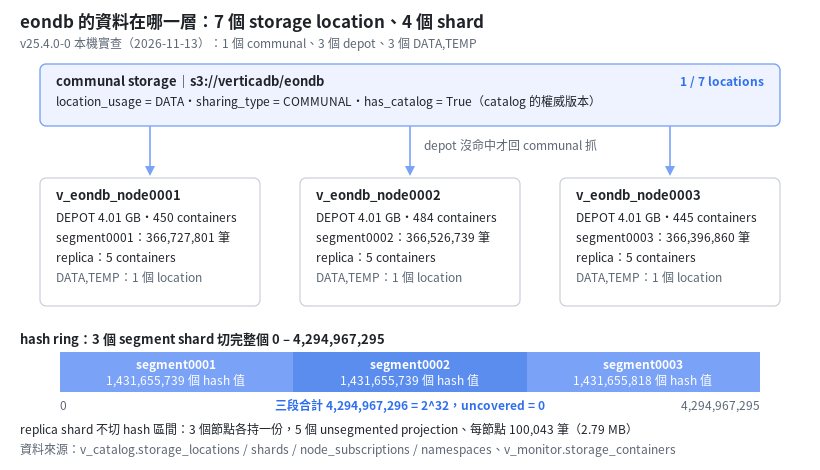
Every number in that diagram comes from this run: 7 locations, 4 shards, the value counts per segment, and the container and depot figures per node.
4. Reading Seven Storage Locations
=> SELECT location_id, node_name, location_path, location_usage, sharing_type, has_catalog
   FROM v_catalog.storage_locations ORDER BY location_usage, node_name, location_id;

     location_id     |     node_name     |              location_path               | location_usage | sharing_type | has_catalog
---------------------+-------------------+------------------------------------------+----------------+--------------+-------------
 45035996273705022   |                   | s3://verticadb/eondb                     | DATA           | COMMUNAL     | t
 45035996273705020   | v_eondb_node0001  | /data/eondb/v_eondb_node0001_data        | DATA,TEMP      | NONE         | f
 45035996273705160   | v_eondb_node0002  | /data/eondb/v_eondb_node0002_data        | DATA,TEMP      | NONE         | f
 45035996273705164   | v_eondb_node0003  | /data/eondb/v_eondb_node0003_data        | DATA,TEMP      | NONE         | f
 45035996273705260   | v_eondb_node0001  | /data/depot/eondb/v_eondb_node0001_depot | DEPOT          | NONE         | f
 45035996273705262   | v_eondb_node0002  | /data/depot/eondb/v_eondb_node0002_depot | DEPOT          | NONE         | f
 45035996273705264   | v_eondb_node0003  | /data/depot/eondb/v_eondb_node0003_depot | DEPOT          | NONE         | f
(7 rows)
Three columns decide how to read these seven rows; skip one and you will misjudge the cluster.
1. sharing_type: only communal is COMMUNAL, the other six are NONE. COMMUNAL means the path is shared by the whole cluster (here, an S3 bucket); NONE means only that one node can see it. So exactly one of the seven is genuinely shared.
2. location_usage: DATA, DATA,TEMP, and DEPOT are three different roles. Note that the communal row is plain DATA, not DATA,TEMP — you do not want temp files in S3. The three node locations carry both DATA and TEMP roles, and the three depots carry only DEPOT.
3. has_catalog: only communal is True. This is the single biggest difference from Enterprise mode: the authoritative catalog lives in communal storage. The catalog directory on each node is a working copy. “The S3 bucket went away” is therefore not “queries got slow” — it is “the database is gone”.
node_name is empty for the communal row, and that is not missing data: it is a cluster-level location that belongs to no single node.
4.1 Why disk_storage has 9 rows while storage_locations has 7
=> SELECT node_name, storage_usage, storage_path, storage_status, throughput, latency
   FROM v_monitor.disk_storage ORDER BY node_name, storage_usage, storage_path;

     node_name     | storage_usage |               storage_path                   | storage_status | throughput | latency
-------------------+---------------+----------------------------------------------+----------------+------------+---------
 v_eondb_node0001  | CATALOG       | /data/eondb/v_eondb_node0001_catalog/Catalog | Active         | 0          | 0
 v_eondb_node0001  | DATA,TEMP     | /data/eondb/v_eondb_node0001_data            | Active         | 0          | 0
 v_eondb_node0001  | DEPOT         | /data/depot/eondb/v_eondb_node0001_depot     | Active         | 200        | 60
 v_eondb_node0002  | CATALOG       | /data/eondb/v_eondb_node0002_catalog/Catalog | Active         | 0          | 0
 v_eondb_node0002  | DATA,TEMP     | /data/eondb/v_eondb_node0002_data            | Active         | 0          | 0
 v_eondb_node0002  | DEPOT         | /data/depot/eondb/v_eondb_node0002_depot     | Active         | 200        | 60
 v_eondb_node0003  | CATALOG       | /data/eondb/v_eondb_node0003_catalog/Catalog | Active         | 0          | 0
 v_eondb_node0003  | DATA,TEMP     | /data/eondb/v_eondb_node0003_data            | Active         | 0          | 0
 v_eondb_node0003  | DEPOT         | /data/depot/eondb/v_eondb_node0003_depot     | Active         | 200        | 60
(9 rows)
9 = 3 nodes × 3 local path types (CATALOG, DATA,TEMP, DEPOT). The seven storage_locations rows contain no local CATALOG path, and the communal row belongs to no node, so the two row counts will never match. Use disk_storage to inventory per-node local storage; use storage_locations to inventory the kinds of data paths the cluster has.
5. Four Shards: Three Pieces of Data Plus One Replica
=> SELECT shard_oid, shard_name, shard_type, lower_hash_bound, upper_hash_bound, is_replicated, has_objects
   FROM v_catalog.shards ORDER BY shard_name;

      shard_oid      | shard_name  | shard_type | lower_hash_bound | upper_hash_bound | is_replicated | has_objects
---------------------+-------------+------------+------------------+------------------+---------------+-------------
 45035996273705000   | replica     | Replica    |                  |                  | t             | t
 45035996273705002   | segment0001 | Segment    | 0                | 1431655738       | f             | t
 45035996273705004   | segment0002 | Segment    | 1431655739       | 2863311477       | f             | t
 45035996273705006   | segment0003 | Segment    | 2863311478       | 4294967295       | f             | t
(4 rows)
All four shards report has_objects = true, including the replica — it is not an empty placeholder, it really holds data (numbers in the next section). replica has is_replicated = true while every segment* is false, which is the cleanest statement of the difference: a segment shard is a slice of the hash space, a replica shard exists on every node.
5.1 The hash ring arithmetic: the three ranges add up to exactly 2^32
Addition is enough to prove there are no gaps:
=> SELECT shard_name, lower_hash_bound, upper_hash_bound,
          upper_hash_bound - lower_hash_bound + 1 AS hash_values
   FROM v_catalog.shards WHERE shard_type = 'Segment' ORDER BY shard_name;

  shard_name  | lower_hash_bound | upper_hash_bound | hash_values
--------------+------------------+------------------+-------------
 segment0001  | 0                | 1431655738       |  1431655739
 segment0002  | 1431655739       | 2863311477       |  1431655739
 segment0003  | 2863311478       | 4294967295       |  1431655818
(3 rows)

=> SELECT sum(upper_hash_bound - lower_hash_bound + 1) AS total_covered,
          power(2,32) AS hash_space,
          power(2,32) - sum(upper_hash_bound - lower_hash_bound + 1) AS uncovered
   FROM v_catalog.shards WHERE shard_type = 'Segment';

 total_covered |  hash_space  | uncovered
---------------+--------------+-----------
    4294967296 | 4294967296.0 |       0.0
(1 row)
uncovered = 0.0, and the ranges are contiguous (each upper bound plus one equals the next lower bound), so there is no value that hashes somewhere but belongs to no shard. Conversely: if uncovered > 0 ever shows up after a rebalance, the hash ring is not stitched together — look there first, not at query syntax.
The bounds are inclusive. segment0001 is 0 ≤ h ≤ 1,431,655,738, and segment0002 starts at 1,431,655,739. Length is upper - lower + 1, not upper - lower. Off by one looks harmless in a single range; across three ranges you get a phantom gap of 3 and spend an afternoon hunting a bug that does not exist.
5.2 What is actually on the replica shard
=> SELECT schema_name, projection_name, count(*) AS containers,
          sum(total_row_count) AS rows, count(DISTINCT node_name) AS nodes
   FROM v_monitor.storage_containers WHERE shard_name = 'replica'
   GROUP BY 1,2 ORDER BY 4 DESC;

 schema_name |         projection_name          | containers |  rows  | nodes
-------------+----------------------------------+------------+--------+-------
 public      | customer_dimension_flex2_1_unseg |          3 | 150000 |     3
 public      | xxx_unseg                        |          3 | 150000 |     3
 lowi        | lowi_user_save_source_unseg      |          3 |    114 |     3
 lowi_vai    | scheduled_task_unseg             |          3 |      9 |     3
 lowi        | lowi_user_save_channel_unseg     |          3 |      6 |     3
(5 rows)
Five projections, three containers each, all three nodes — the _unseg suffix is the answer: unsegmented projections are not hashed, so they land in the replica shard with one copy per node. Per node that is 100,043 rows and 2,786,722 bytes (50,000 + 50,000 + 38 + 3 + 2).
The practical consequence: the replica shard is neither a backup nor a K-Safe guarantee. It ensures a table is readable locally on every node; it does not keep segment data alive when a node dies. That is the job of subscriptions, and each segment here has exactly one.
5.3 default_shard_count = 3 does not contradict four shards
=> SELECT namespace_oid, namespace_name, is_default, default_shard_count
   FROM v_catalog.namespaces;

   namespace_oid    |   namespace_name   | is_default | default_shard_count
--------------------+--------------------+------------+---------------------
 45035996273704994  | default_namespace  | t          |                   3
(1 row)
default_shard_count answers “how many pieces is this namespace’s data split into” — 3. v_catalog.shards counts shard objects, including the replica — 4. Use 3 to size a depot (each node holds only its own piece) and 4 to inventory shard objects. I have seen both mistakes: multiplying by 4 overstates space by 33%.
6. Six Node Subscriptions: Who Is Primary
=> SELECT node_name, shard_name, is_primary, subscription_state
   FROM v_catalog.node_subscriptions ORDER BY node_name, shard_name;

     node_name     | shard_name  | is_primary | subscription_state
-------------------+-------------+------------+--------------------
 v_eondb_node0001  | replica     | t          | ACTIVE
 v_eondb_node0001  | segment0001 | t          | ACTIVE
 v_eondb_node0002  | replica     | f          | ACTIVE
 v_eondb_node0002  | segment0002 | t          | ACTIVE
 v_eondb_node0003  | replica     | f          | ACTIVE
 v_eondb_node0003  | segment0003 | t          | ACTIVE
(6 rows)
Six rows = one per segment plus three for the replica. How to read them:
- Each segment has exactly one subscription, and it is the primary. No second node subscribes to the same segment, so there are no buddy copies and K-Safe is 0. That matches the
WARNING 6046the driver printed on connect: one number derived from the catalog, one stated by the server. When they agree, you have read the catalog correctly. - The replica shard has three subscriptions, and only node0001 is primary. The primary copy takes writes; the other two are copies of the same data. That is why all three nodes report identical replica container counts (100,043 rows each).
- Every
subscription_stateisACTIVE. If one is not, check the node and its depot before you suspect a query.
=> SELECT s.shard_name, s.shard_type, count(ns.node_name) AS subscriptions,
          sum(CASE WHEN ns.is_primary THEN 1 ELSE 0 END) AS primaries
   FROM v_catalog.shards s
   LEFT JOIN v_catalog.node_subscriptions ns ON ns.shard_name = s.shard_name
   GROUP BY 1,2 ORDER BY 1;

  shard_name  | shard_type | subscriptions | primaries
--------------+------------+---------------+-----------
 replica      | Replica    |             3 |         1
 segment0001  | Segment    |             1 |         1
 segment0002  | Segment    |             1 |         1
 segment0003  | Segment    |             1 |         1
(4 rows)
This belongs in your health check: any segment with subscriptions = 1 is a segment without fault tolerance. On three nodes the maximum K-Safe is 1; here it is 0, so losing any single node makes one third of the data unavailable.
7. Step by Step: One Connection, Whole Cluster
An EON connection is one entry point with three executors. Run EXPLAIN through port 1533 and the plan itself lists which subscriptions take part:
=> EXPLAIN SELECT count(*) FROM online_sales.online_sales_fact WHERE sale_date_key = 100;

+-GROUPBY NOTHING [Cost: 2K, Rows: 1 (ROW COUNT ONLY)] (PATH ID: 1)
|  Aggregates: count(*)
|  Execute on: All Nodes
| +---> STORAGE ACCESS for online_sales_fact [Cost: 2K, Rows: 5M (ROW COUNT ONLY)] (PATH ID: 2)
| |      Projection: default_namespace.online_sales.online_sales_fact_super
| |      Filter: (online_sales_fact.sale_date_key = 100)
| |      Execute on: All Nodes
The GraphViz half of the same plan names the nodes and subscriptions (excerpt):
All Nodes Vector:

  node[0]=v_eondb_node0001 (initiator) Up
  node[1]=v_eondb_node0002 (executor) Up
  node[2]=v_eondb_node0003 (executor) Up

Participating subscriptions:

  replica: [<0, 1, 2>]
  segment0001: [<0>]
  segment0002: [<1>]
  segment0003: [<2>]
Three immediately useful observations:
node[0]is the initiator; the other two are executors. You connected to node0001, but the plan runs on three nodes. “Connecting to one node means using one node” is simply false in EON.replica: [<0, 1, 2>]maps to the three node indexes, and each segment maps to one. That is the same shard-to-node map as the six subscription rows — the plan prints it for you.Rows: 5M (ROW COUNT ONLY)means the optimizer has statistics but read no data;EXPLAINdoes not scan the table, so it is safe on a shared cluster.
One trap to avoid: you cannot compute shard placement with SQL HASH(). Measured:
=> SELECT hash('abc') AS h1, hash('hello world') AS h2, hash(42) AS h3;

         h1          |         h2         |         h3
---------------------+--------------------+---------------------
 1193732203864995963 |  671172152162102109 | 4619354834034727894
(1 row)
1,193,732,203,864,995,963 is far above the shard upper bound of 4,294,967,295 (2^32 − 1), so hash(col) BETWEEN lower AND upper cannot tell you where a row lands. To find placement, read shard_name / segment_lower_bound in v_monitor.storage_containers, or the Participating subscriptions in EXPLAIN. Do not compute it yourself.
8. Where the Data Actually Sits: 1,394 Containers
=> SELECT node_name, shard_name, count(*) AS containers,
          sum(total_row_count) AS rows, sum(disk_size) AS disk_bytes
   FROM v_monitor.storage_containers
   GROUP BY 1,2 ORDER BY 1,2;

     node_name     | shard_name  | containers |   rows    | disk_bytes
-------------------+-------------+------------+-----------+-------------
 v_eondb_node0001  | replica     |          5 |    100043 |     2786722
 v_eondb_node0001  | segment0001 |        450 | 366727801 |  4014633044
 v_eondb_node0002  | replica     |          5 |    100043 |     2786722
 v_eondb_node0002  | segment0002 |        484 | 366526739 |  4012567490
 v_eondb_node0003  | replica     |          5 |    100043 |     2786722
 v_eondb_node0003  | segment0003 |        445 | 366396860 |  4012222615
(6 rows)
This is the most persuasive table in the article because it proves three things at once:
- Each node holds only its own segment’s containers. node0001 has no
segment0002containers and vice versa. Placement in EON is decided by shard, not by projection segmentation. - The three segments are evenly loaded. Rows: 366,727,801 / 366,526,739 / 366,396,860 — a spread of 330,941 rows, 0.09%. Disk: 4,014,633,044 / 4,012,567,490 / 4,012,222,615 — within 0.06%. The hash ranges themselves differ by only 79 values (1,431,655,818 versus 1,431,655,739), so this evenness is designed, not lucky.
- Container counts do not track row counts. node0002 holds 366,526,739 rows in 484 containers while node0003 holds 366,396,860 in 445 — average rows per container differs, because mergeout timing and partition sizes differ. Estimating data volume from container counts will always be wrong.
Cluster totals:
=> SELECT sum(total_row_count) AS rows, count(*) AS containers,
          sum(disk_size) AS disk_bytes, count(DISTINCT projection_id) AS projections
   FROM v_monitor.storage_containers;

    rows     | containers |  disk_bytes  | projections
-------------+------------+--------------+-------------
 1099951529  |       1394 |  12047783315 |         221
(1 row)
1,099,951,529 rows, 1,394 containers, 12,047,783,315 bytes (about 12.05 GB) across 221 projections. The catalog holds 486 projections — “how many projections exist” and “how many have containers” are two different questions, and the 265 in between either have not materialised yet or have been superseded.
8.1 Do not size a depot from disk_storage’s MB figures
=> SELECT node_name, storage_usage, disk_space_used_mb, disk_space_free_mb, disk_space_free_percent
   FROM v_monitor.disk_storage WHERE storage_usage IN ('DEPOT','DATA,TEMP')
   ORDER BY node_name, storage_usage;

     node_name     | storage_usage | disk_space_used_mb | disk_space_free_mb | disk_space_free_percent
-------------------+---------------+--------------------+--------------------+-------------------------
 v_eondb_node0001  | DATA,TEMP     |             687236 |             213003 | 23%
 v_eondb_node0001  | DEPOT         |             687236 |             213003 | 23%
 v_eondb_node0002  | DATA,TEMP     |             687236 |             213003 | 23%
 v_eondb_node0002  | DEPOT         |             687236 |             213003 | 23%
 v_eondb_node0003  | DATA,TEMP     |             687236 |             213003 | 23%
 v_eondb_node0003  | DEPOT         |             687236 |             213003 | 23%
(6 rows)
On the same node the DEPOT and DATA,TEMP rows are identical (687,236 MB used, 213,003 MB free, 23%), because those columns describe the filesystem, not the location directory. The actual depot content is 12,047,783,315 bytes (12.05 GB) — two orders of magnitude away from 687,236 MB (671 GB).
So: v_monitor.disk_storage answers “how much space does this filesystem have left”, never “how much is the depot using”. Use disk_size in storage_containers for depot content. And throughput = 200 / latency = 60 are configured performance settings, not measurements — do not feed them to an I/O dashboard.
9. Common Mistakes and Anti-Patterns
1. Treating seven storage locations as seven copies of data
Six of the seven are per-node paths (three depots, three data locations); only one is shared. Read sharing_type first; only COMMUNAL is shared.
2. Sizing capacity from default_shard_count or count(*) FROM shards without knowing which
3 and 4 both come from system tables and answer different questions. Each node holds one segment, so per-node data is roughly total ÷ 3. Dividing by 4 gives you a 25% error.
3. Computing shard placement with HASH()
HASH() returns 64-bit values (measured 1,193,732,203,864,995,963); shard bounds are 32-bit (0–4,294,967,295). Different spaces; the arithmetic produces plausible, wrong answers.
4. Using disk_storage MB as depot usage
See 8.1: it is the filesystem, identical across three rows on one node. The gap between 671 GB and 12.05 GB can flip an expansion decision.
5. Assuming the replica shard is a backup and skipping backups
The replica holds five unsegmented projections (100,043 rows per node). Segment data lives only in communal storage and the depots. At K-Safe=0, losing a node costs a third of your availability; losing communal storage loses everything. Replication and backup are different problems.
6. Reaching for LISTAGG on 25.4 to concatenate node lists
Trying to collapse the per-node shard list into one line:
ERROR 3457:  Function listagg(varchar, unknown) does not exist,
or permission is denied for listagg(varchar, unknown)
HINT:  No function matches the given name and argument types.
       You may need to add explicit type casts.
This 25.4.0-0 build does not have it. Verify the function exists before shipping string aggregation in monitoring SQL — or return multiple rows with GROUP BY, as section 6 does.
10. Risks and Recommendations
Safe today (read-only / low risk)
- Run the three-segment coverage check daily.
uncovered > 0means a hole in the hash ring and is a P1 — no need to wait for symptoms. - Track subscriptions per segment. A segment with one subscription is exactly the third of your data that disappears when a node does.
- Trend depot capacity from
storage_containers, notdisk_storage. The two differ by two orders of magnitude; using the wrong one produces false “depot almost full” alarms. - Alert below 20% free space. All three nodes sit at 23%, which is close; a full depot triggers eviction, and queries silently start reading communal storage instead of erroring — the hardest degradation to notice.
- Check
has_catalog. Only communal should beTruein a healthy EON cluster; a node location withhas_catalog = Truedeserves an explanation.
Requires change (window / approval)
- K-Safe 0 → 1. Needs at least twice the segment space and enough nodes; subscription counts and depot usage both change. Not done here — every K-Safe statement in this article is derived from existing subscriptions, not measured after a change.
- Adding nodes or rebalancing. Shard count stays, subscriptions change; any script that assumes a fixed segment-to-node map must be rewritten.
- Changing
DepotSizePercentor moving the depot path. Cluster-level changes, not something to “try” on a shared cluster. - Creating a second namespace. Each namespace gets its own set of shards and its own
default_shard_count; multiple namespaces break every “there are 4 shards” intuition.
11. References
- Vertica 25.4 documentation: Eon Mode architecture — https://docs.vertica.com/25.4.x/en/architecture/eon-mode-architecture/
- Vertica 25.4 documentation: Eon Mode storage locations — https://docs.vertica.com/25.4.x/en/admin/managing-storage/storage-locations/
- Vertica 25.4 documentation: Shards and subscriptions — https://docs.vertica.com/25.4.x/en/architecture/eon-mode-architecture/shards-and-subscriptions/
- Vertica 25.4 documentation: v_catalog.shards — https://docs.vertica.com/25.4.x/en/sql-reference/system-tables/v-catalog-tables/shards/
- Vertica 25.4 documentation: v_catalog.node_subscriptions — https://docs.vertica.com/25.4.x/en/sql-reference/system-tables/v-catalog-tables/node-subscriptions/
Note:
docs.vertica.comcurrently 302-redirects todocs.rocketsoftware.com/bundle/vertica_25.4/with the same page paths; all links above returned HTTP 200 when checked on 2026-11-13.
FAQ
Seven storage locations — does that mean seven copies of the data?
No. The seven rows are one communal location (`s3://verticadb/eondb`, `sharing_type = COMMUNAL`, `has_catalog = True`), three per-node depots, and three per-node DATA,TEMP locations. The authoritative data lives in communal storage; each depot is a local cache, and DATA,TEMP holds temporary and local files. They are three different roles, not three replicas of the same bytes.
There are 4 shards, so why does v_catalog.namespaces report default_shard_count = 3?
`v_catalog.shards` has four rows: `replica` (type Replica, no hash bounds) plus `segment0001` through `segment0003`. `default_shard_count` counts data segments only, so it says 3. Both numbers are correct; one counts shard objects, the other counts how many pieces the data is split into. Use 3 for per-node capacity math and 4 when inventorying shard objects.
Do the three segment ranges leave gaps or overlap?
Neither. `upper_hash_bound - lower_hash_bound + 1` gives 1,431,655,739, 1,431,655,739, and 1,431,655,818, summing to 4,294,967,296, which equals `power(2,32)`, with `uncovered = 0`. The bounds are contiguous: 0–1,431,655,738, 1,431,655,739–2,866,311,477, and 2,866,311,478–4,294,967,295.
Is the replica shard a backup, and what does it do at K-Safe=0?
It is not a backup. On this cluster the replica shard holds five unsegmented projections (`public.customer_dimension_flex2_1_unseg`, `public.xxx_unseg`, and three small `lowi`/`lowi_vai` tables). Each node holds five containers, 100,043 rows, and 2,786,722 bytes of them, identical on all three nodes. It exists so tables that are not hash-segmented have a local copy everywhere. Fault tolerance for segment data comes from subscriptions: each segment here has exactly one, so K-Safe is 0.
How do I confirm data really stays on its own segment?
Group `v_monitor.storage_containers` by node and shard. node0001 holds only `segment0001` containers (450 rows-groups, 366,727,801 rows), node0002 only `segment0002` (484 containers, 366,526,739 rows), node0003 only `segment0003` (445 containers, 366,396,860 rows), plus five replica containers each. The whole cluster is 1,394 containers and 1,099,951,529 rows, and the largest and smallest segment differ by 0.09%.